
Step 1: Bring to Desktop View
If you are not already in Desktop View, bring up Desktop View by pressing the Windows key + D on your keyboard.
Step 2: Open \\\’Computer File Exployer\\\’
Open up the \\\’Computer\\\’ window by pressing Windows key + E on your keyboard.
Advertisement

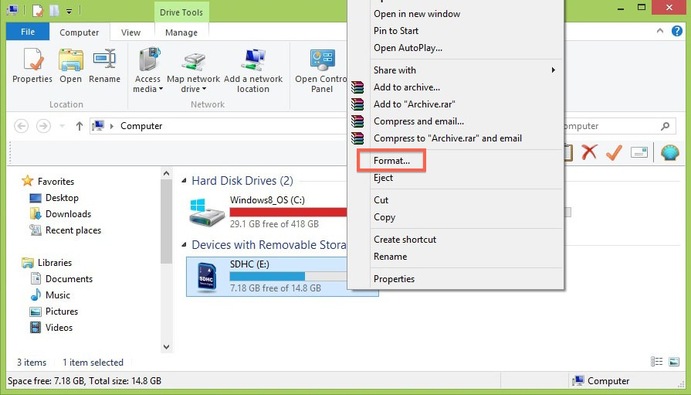
Step 3: Display right-click options
Your SD card should be displayed
in the \\\’Devices with Removable
Storage\\\’ section. Right-click on
your SD card to bring up the right-
click menu options. Select Format.
Step 4: Format the SD card
1. In the Format window make sure that the correct File System is selected. It should be set to FAT32 for 32GB SD cards and EXFAT for 64GB SD cards.
2. Select Quick Format.
3. Click Start.
4. Once the formatting is complete, you can close the window.
Congratulations! You have formatted your SD card.
Advertisement