
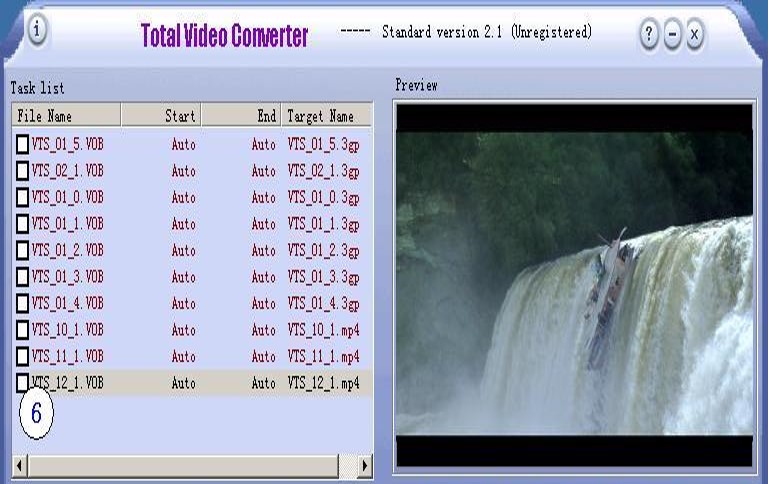

Total Video Converter is a total solution for video conversion which supports reading, playing all kinds of video and audio formats and converting them to popular video formats. Total Video Converter includes a powerful media conversion engine internally so that you can convert media files with very fast speed.
Strongly recommended main features with particularly attractive characteristic:
l Convert all kinds of videos to mobile videos or audios (mp4, 3gp, xvid, divx mpeg4 avi, amr audio) which are used by cellphone, PDA, PSP;
2 High compatibility and high efficiency for Importing RMVB or RM video/audio;
3 Convert various videos to MPEG videos compatible with standard DVD/SVCD/VCD;
4 Rip DVD to popular videos of all sorts;
5 Extract audio from various of videos and convert which to all kinds of audios (mp3, ac3, ogg, wav, aac);
6 RIP CD to audios of all sorts directly.
7 Support using with command line(pro version)
8 Combine several video and audio files to one video file
9 Demultiplex or extract video and audio from one file
10 Multiplex video and audio to one file
Advertisement

Total Video Converter supports reading the following file formats:
Video Formats:
· Rmvb(.rm,.rmvb)
· MPEG4(.mp4)
· 3gp(.3gp, 3g2)
· Game Psp(.psp)
· MPEG1(.mpg, mpeg)
· MPEG2 PS (.mpg, mpeg, vob)
· MPEG2 TS (DVB Transport Stream)
· Ms ASF(.asf, .wmv)
· Ms AVI(.avi)
· Macromedia Flash video FLV (.flv)
· Real Video (rm)
· Apple Quicktime(.mov)
· FLIC format(.fli, .flc)
· Gif Animation(.gif)
· DV (.dv)
· Video Formats Dx9 Directshow can open
Audio Formats:
· CD audio(.cda)
· MPEG audio(.mp3, mp2)
· Ms WAV(.wav)
· Ms WMA(.wma)
· Real Audio (.ra)
· OGG(.ogg)
Advertisement
· Amr audio(.amr)
· AC3(.ac3)
· SUN AU format (.au)
· Macromedia Flash embedded audio(.swf)
· Audio Formats Dx9 Directshow can open
Game Video Formats:
· Technologies format, used in some games(.4xm)
· Playstation STR
· Id RoQ used in Quake III, Jedi Knight 2, other computer games
· format used in various Interplay computer games,Interplay MVE
· multimedia format used in Origin\\\’s Wing Commander III computer game,WC3 Movie
Advertisement

· used in many Sega Saturn console games, Sega FILM/CPK
· Multimedia formats used in Westwood Studios games, Westwood Studios VQA/AUD
· Used in Quake II, Id Cinematic (.cin)
· used in Sierra CD-ROM games, Sierra VMD
· used in Sierra Online games, .sol files
· Electronic Arts Multimedia, Matroska
· used in various EA games; files have extensions like WVE and UV2
· Nullsoft Video (NSV) format
Total Video Converter supports generating the following file formats:
Video Formats:
· MPEG4(.mp4)
· 3gp(.3gp, 3g2)
· Game Psp(.psp)
· MPEG1(.mpg, mpeg)
· NTSC, PAL DVD mpeg
· NTSC, PAL SVCD mpeg
· NTSC, PAL VCD mpeg
· Ms Mpeg4 AVI(.avi)
Advertisement
· Divx AVI(.avi)
· Xvid AVI(.avi)
· H264 AVI(.avi)
· Mjpeg AVI(.avi)
· HuffYUV AVI(.avi)
· Swf Video(.swf)
· Flv Video (.flv)
· Gif Animation(.gif)
· Mpeg4 Mov(.mov)
· Apple Quicktime(.mov)
· FLIC format(.fli, .flc)
· Gif Animation(.gif)
· DV (.dv)
Audio Formats:
· MPEG audio(.mp3, mp2)
· Ms WAV(.wav)
· Ms WMA(.wma)
· OGG(.ogg)
· Amr audio(.amr)
· AC3(.ac3)
· SUN AU format (.au)
· AAC(mp4 audio)
How To Convert Files
Step 1. Click \\\’New Task\\\’ button to add files which you want to convert or preview to the task list;
Step 2. After the files being selected, a window \\\’Please select the format to be covnerted\\\’ will popup to remind you select, click the appropriate button;
Note: (Step 3 – Step 5) can be bypassed if you do not want to preview the video or set the starting point/ending point)
Step 3. Click the button to preview the video file;
Step 4. Click the \\\'[\\\’ button to set the starting point for the converted file;
Step 5. Click the \\\’]\\\’ button to set the ending point for the converted file;
Advertisement
Step 6. Check the items in the task list to select the file you want to convert indeed;
Step 7. Click the \\\’Convert Now\\\’ button to start your video converting. A progress window will pop up to remind the progress having coverted;
Step 8. After waiting for the prgress window disappear for having completed conversion, click the buttopn \\\’Open\\\’ to open directory that the converted file saved.

Good Luck

Gute Arbeit. Danke.
Thanks a bunch for sharing this with all of us you actually know what you’re talking about! Bookmarked. Kindly also visit my web site =). We could have a link exchange arrangement between us!
Super geschrieben.Vielen Dank.